Enjoy 5% OFF + FREE shipping on orders $49+! Use Code: 202512AK5

Enjoy 5% OFF + FREE shipping on orders $49+! Use Code: 202512AK5
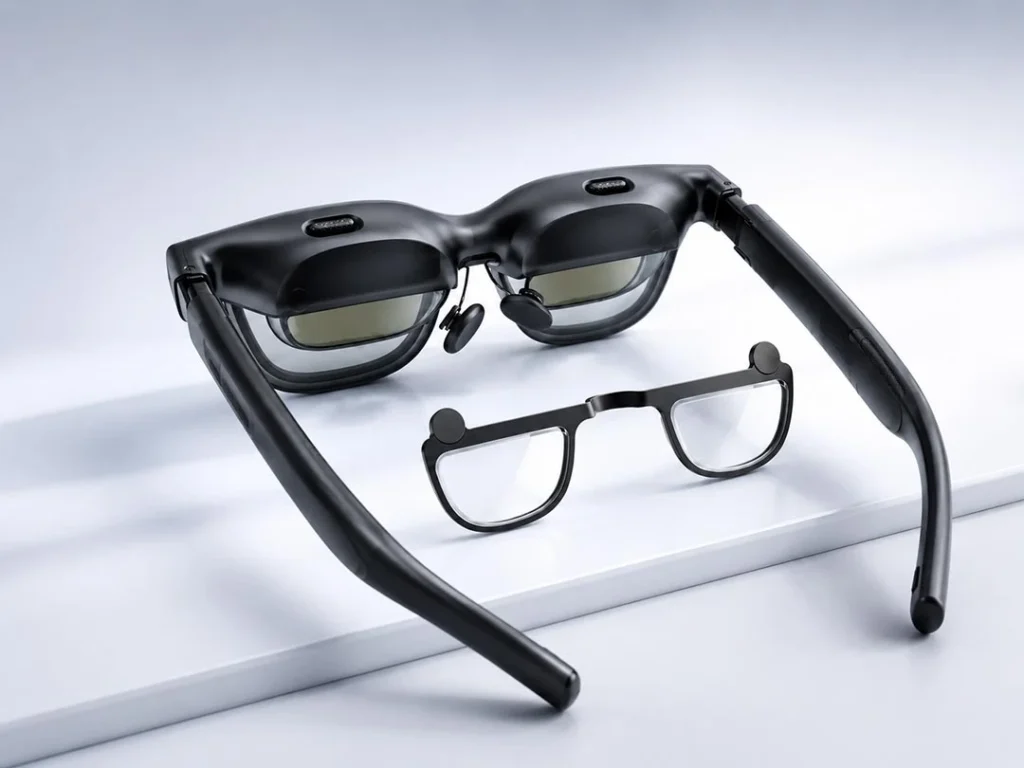
The world of spatial computing and extended reality (XR) is rapidly evolving, and smart glasses have become a practical way to experience digital content on a large virtual screen. With their ability to project virtual displays directly in front of your eyes, devices in the VITURE Luma series can be used for gaming, work, streaming, and travel.
However, because XR glasses sit close to your face while optically presenting content at a longer viewing distance, visual clarity depends heavily on your personal prescription, your frame fit, and how well the optics align with your eyes.
For many users, the built-in adjustment features on XR glasses are helpful. Still, individual vision needs—such as astigmatism, higher myopia, different prescriptions in each eye, or PD/IPD differences—may require a more complete optical setup.
In this guide, you’ll learn how VITURE Luma prescription lenses work, who may benefit from custom inserts, how built-in myopia adjustment compares with prescription lenses, and how to choose the right setup for VITURE Luma, Luma Pro, or Luma Ultra.
What Are VITURE Luma Prescription Lenses?
VITURE Luma prescription lenses are custom optical inserts designed to fit inside VITURE Luma XR glasses. Instead of wearing your everyday eyeglasses under the headset, you can use prescription inserts matched to your own vision needs.
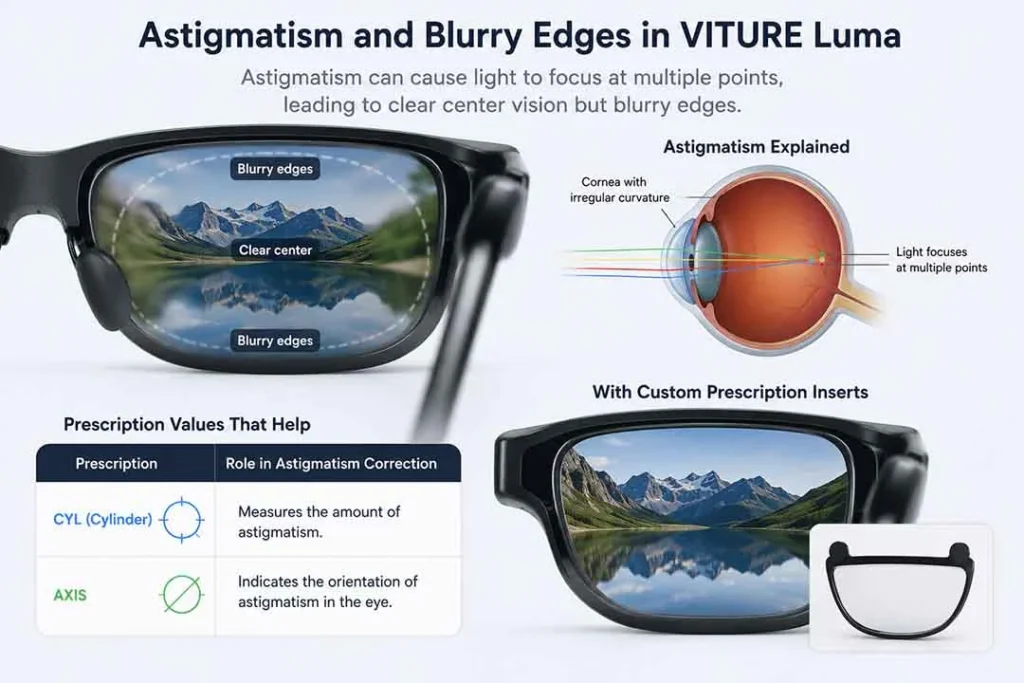
These inserts are made according to your prescription, including values such as SPH, CYL, AXIS, and PD. This can support a more complete prescription setup than built-in myopia adjustment alone, especially for users who have astigmatism or different prescriptions in each eye.
When you order from the ANNKUTVR VITURE Luma prescription lenses page, you can select your model, choose the correct frame size, and enter or upload your prescription details.
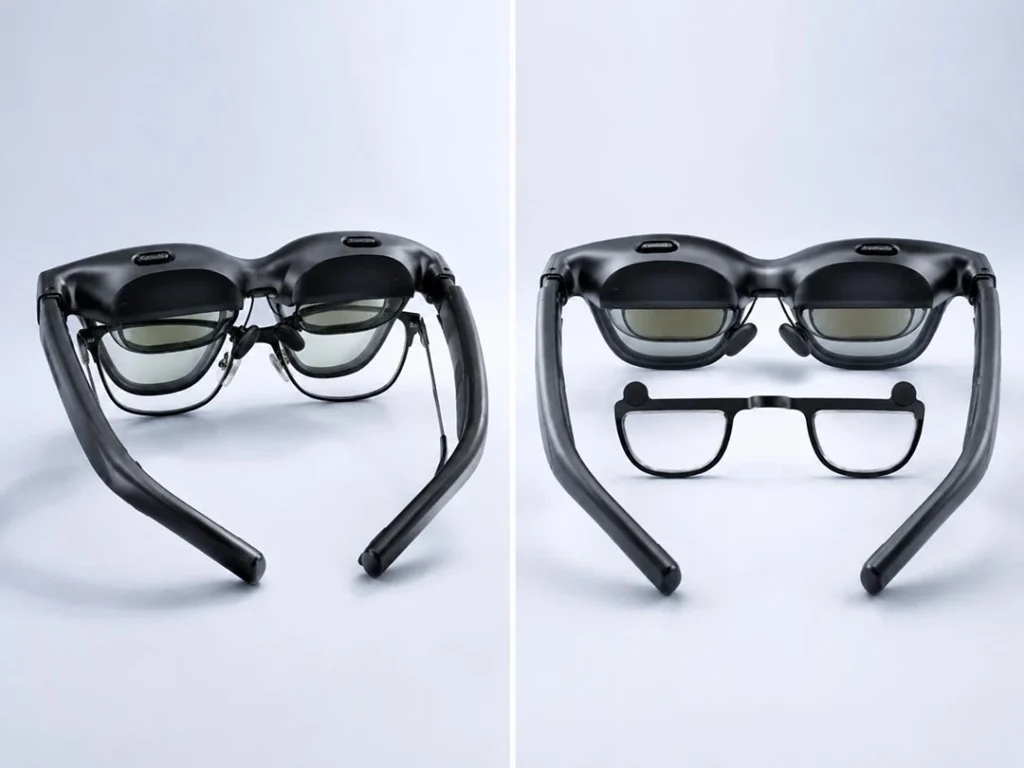
ANNKUTVR lenses are designed to fit the VITURE Luma lineup and support a low-profile viewing setup. This may help reduce the need to wear regular eyeglasses under your XR glasses.
Enhance Your XR Viewing Experience
Custom magnetic inserts designed for your prescription needs, built to support a more comfortable XR viewing setup.
View Custom LensesWho May Need Prescription Inserts for VITURE Luma?
Some users may achieve clear viewing with the headset’s built-in settings. Others may find that their vision needs require custom prescription inserts. The most common groups include glasses wearers, users with astigmatism, users with higher myopia, and users with different prescriptions in each eye.
Glasses wearers
If you rely on prescription glasses every day, wearing them underneath XR glasses may feel uncomfortable. Stacking your regular frames under VITURE Luma can create pressure around the nose bridge and temples. It may also reduce comfort during longer sessions.
There is also a potential risk of your eyeglass lenses touching the internal display lenses of the headset. Dedicated prescription inserts are designed to reduce the need for stacking regular glasses under the device.
Users with astigmatism
Astigmatism is a common refractive error related to the shape of the cornea or lens. It can cause text, edges, or light sources to appear blurred, stretched, or distorted.
The built-in myopia adjustment on VITURE Luma is designed for spherical focus changes. It does not replace a full prescription that includes CYL and AXIS values for astigmatism. If your prescription includes astigmatism correction, custom inserts may be a better option.
For a deeper explanation, see our upcoming guide on VITURE Luma and astigmatism.
Users with high myopia
Myopia, also called nearsightedness, requires negative lens power to correct distance vision. VITURE Luma models include built-in myopia adjustment, but each model has its own adjustment range.
If your prescription is stronger than the built-in adjustment range of your device, the virtual screen may still appear blurry. In that case, custom prescription lenses may be a better option, depending on your prescription range and lens availability.
Users with different prescriptions in each eye
Many people have different prescriptions for their left and right eyes. This is normal. However, when using XR glasses, both eyes need to work together to create a balanced viewing experience.
If one eye sees the virtual screen more clearly than the other, you may experience visual discomfort or uneven clarity. Custom inserts are made separately for each eye, which may support a more balanced setup.
VITURE Built-in Myopia Adjustment vs Prescription Inserts
The VITURE Luma series includes built-in myopia adjustment dials. These dials adjust the device’s internal optics to help compensate for nearsightedness. For users with mild, straightforward myopia and no astigmatism, this feature may be enough.
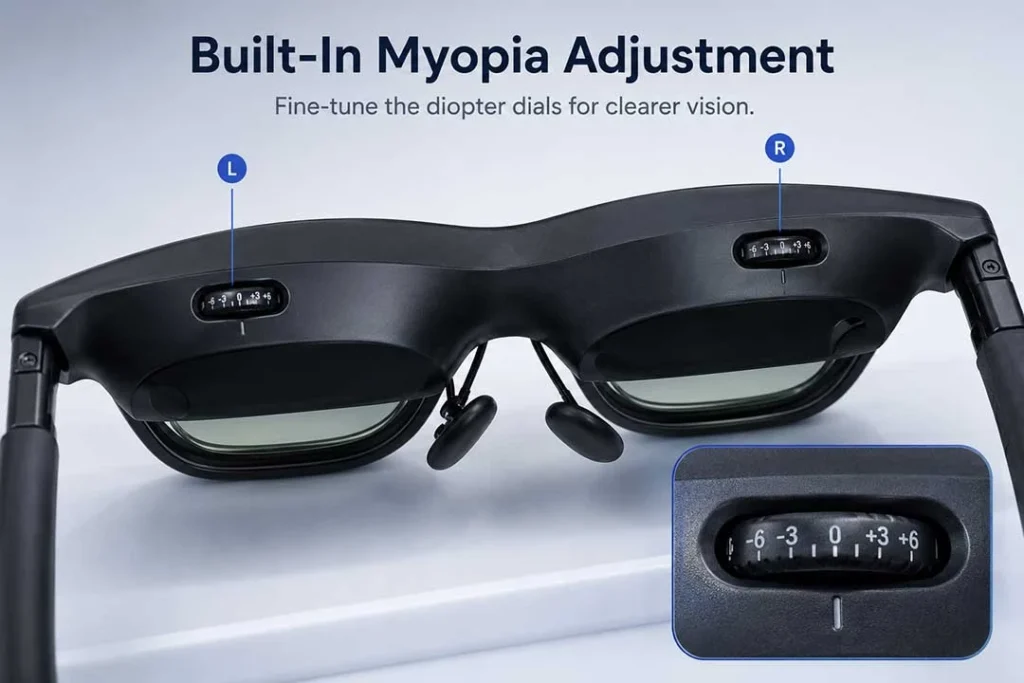
However, built-in myopia adjustment is not the same as prescription lenses. It mainly addresses spherical correction, while custom prescription inserts can account for SPH, CYL, AXIS, and different prescriptions in each eye.
| User Situation | VITURE Built-in Myopia Adjustment | ANNKUTVR Prescription Lenses | Best Recommendation |
|---|---|---|---|
| Mild Myopia | May be sufficient if your prescription falls within the supported range. | Can also be used for a dedicated optical setup. | Built-in adjustment may be enough, but inserts can support comfort and consistency. |
| High Myopia | Limited by the device’s built-in adjustment range. | Can be customized for stronger prescriptions, depending on your prescription range. | ANNKUTVR inserts may be a better option if your prescription exceeds the built-in range. |
| Astigmatism | Does not replace CYL and AXIS correction. | Customized based on your CYL and AXIS values. | Prescription inserts may be a better option for astigmatism-related blur. |
| Different Left/Right Prescriptions | Requires manual adjustment for each eye. | Made separately for each eye. | Custom inserts may support a more balanced viewing experience. |
| Wearing Regular Glasses Under the Device | Not related to frame comfort. | Reduces the need to wear regular glasses under the headset. | Inserts may offer a more streamlined setup. |
Swipe left or right to view the full comparison table on mobile.
VITURE Luma, Luma Pro, and Luma Ultra: What’s the Difference for Prescription Users?
When choosing prescription lenses, it is important to understand which VITURE model you own. Luma, Luma Pro, and Luma Ultra have different optical specifications, frame size options, and built-in adjustment limits.
Official specification references used in this section:
- VITURE Luma XR Glasses official specifications
- VITURE Luma Pro XR Glasses official specifications
- VITURE Luma Ultra XR/AR Glasses official specifications
VITURE Luma
The standard VITURE Luma offers built-in myopia adjustment up to -6.0D. Before ordering prescription inserts, confirm the correct model and frame size on the ANNKUTVR product page.
If your myopia falls within the built-in range and you do not have astigmatism, the built-in dials may be enough. However, users with astigmatism, stronger prescriptions, or different prescriptions in each eye may still want to consider prescription inserts.
VITURE Luma Pro
VITURE Luma Pro offers a wider 52° FOV, 1200p resolution, and 1000 nits peak perceived brightness. Its built-in myopia adjustment is listed up to -4.0D, which is lower than the base Luma model’s -6.0D range.
If your prescription is stronger than the built-in adjustment range, or if your prescription includes CYL and AXIS values, custom inserts may be a better option.
For a detailed comparison, see our upcoming VITURE Luma vs Luma Pro prescription lens guide.
VITURE Luma Ultra
VITURE Luma Ultra is positioned as a higher-end XR/AR model with 52° FOV, 1200p resolution, 1500 nits peak perceived brightness, 6DoF support, and up to -4.0D myopia adjustment.
If you are ordering prescription inserts for Luma Ultra, confirm that you choose the correct model and lens option before placing your order.ou choose the correct frame size and lens option before placing your order.
What Do SPH, CYL, AXIS, PD, and IPD Mean?
When ordering custom prescription lenses, you need to enter your prescription accurately. Understanding the basic terms can help you avoid mistakes.
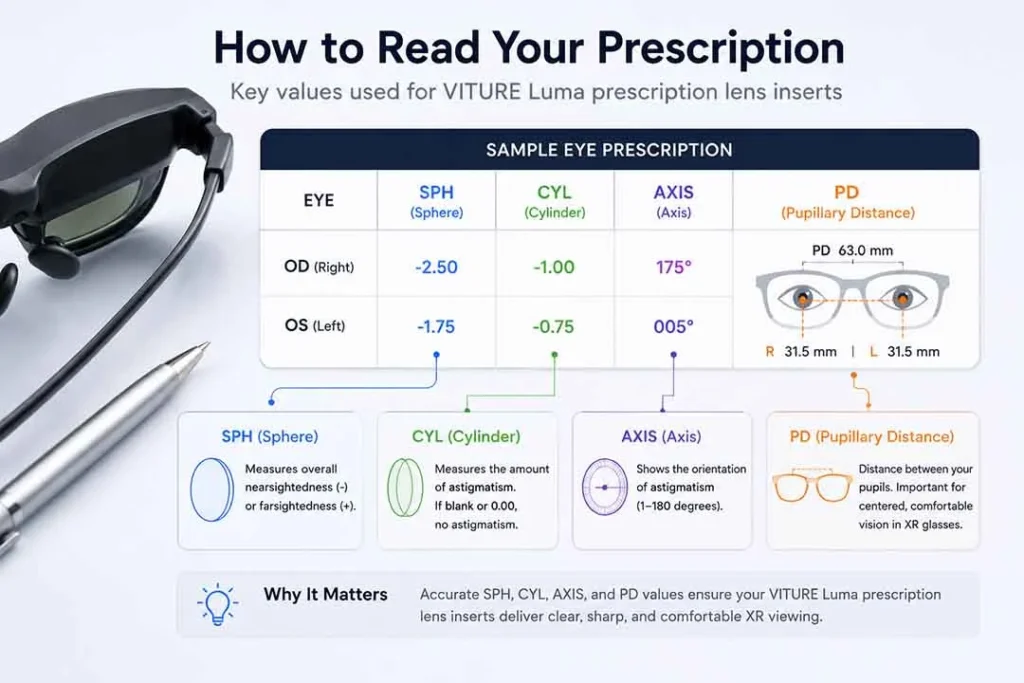
SPH
SPH stands for Sphere. It shows the lens power needed to correct nearsightedness or farsightedness. A minus sign means myopia, while a plus sign means hyperopia.
CYL
CYL stands for Cylinder. This value is used to correct astigmatism. If your prescription includes CYL, you should enter it when ordering prescription inserts.
AXIS
AXIS is the angle of your astigmatism correction. It is usually shown as a number between 1 and 180. If you have a CYL value, you should also have an AXIS value.
PD and IPD
PD stands for Pupillary Distance. IPD stands for Interpupillary Distance. Both relate to the distance between your pupils. In XR glasses, accurate optical alignment is important because your eyes need to line up well with the device optics.
If your prescription or frame alignment is off, you may notice blur, discomfort, or difficulty finding the visual sweet spot.
For more details, see our upcoming VITURE Luma IPD and PD guide.
How to Choose the Right Frame Size: Regular vs Large
VITURE Luma models may be available in different frame sizes, such as Regular and Large. Choosing the correct size matters because the lens inserts must match your device and your optical alignment.
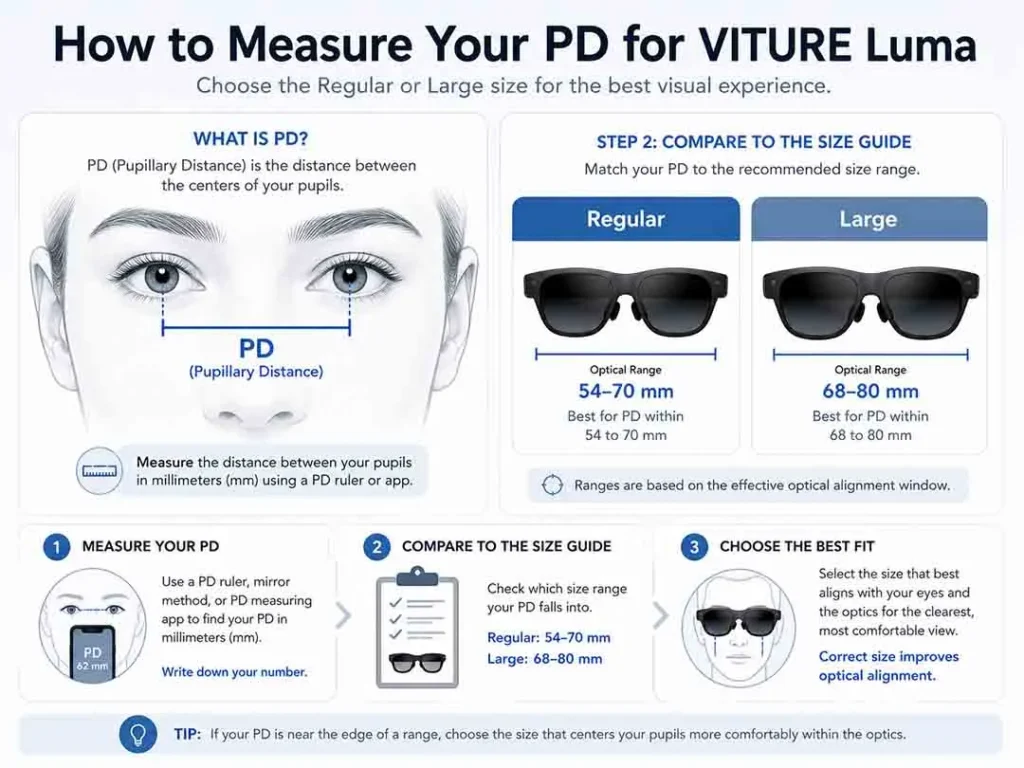
Regular Size
Regular size is generally designed for users with an IPD closer to the standard range. It may be suitable for many users, but you should confirm your device size before ordering inserts.
Large Size
Large size is designed for users with a wider IPD or for models that support the larger frame option. If your eyes are set farther apart, choosing the correct frame size may help with alignment and viewing comfort.
Before ordering, confirm whether your VITURE Luma, Luma Pro, or Luma Ultra device uses Regular or Large frame sizing.
Designed for Your Unique Prescription
ANNKUTVR lenses can support a more complete prescription setup, including higher myopia and astigmatism.
Explore Luma InsertsHow to Order ANNKUTVR Prescription Lenses for VITURE Luma
Ordering custom optical inserts from ANNKUTVR is designed to be straightforward. Before placing your order, prepare your latest prescription and confirm your VITURE model and frame size.
Step 1: Get your latest prescription
Use an up-to-date prescription from your eye care professional. Make sure it includes SPH and, if applicable, CYL and AXIS.
Step 2: Visit the product page
Go to the official ANNKUTVR VITURE Luma prescription lenses page.
Step 3: Select your model and frame size
Choose the correct VITURE model and frame size. This helps ensure the inserts match your device.
Step 4: Enter your prescription
Input your right eye and left eye values exactly as shown on your prescription. Pay close attention to minus signs, plus signs, CYL, and AXIS.
Step 5: Provide your PD
Enter your single PD or dual PD if available. If you are unsure, check your prescription or ask your eye care provider.
Step 6: Upload your prescription if needed
If you are unsure how to enter the numbers, use the option to upload your prescription during checkout if available.
Installation and Care Tips
Once your inserts arrive, follow the installation instructions provided with the product. Make sure your hands are clean and the lenses are free from dust before installation.
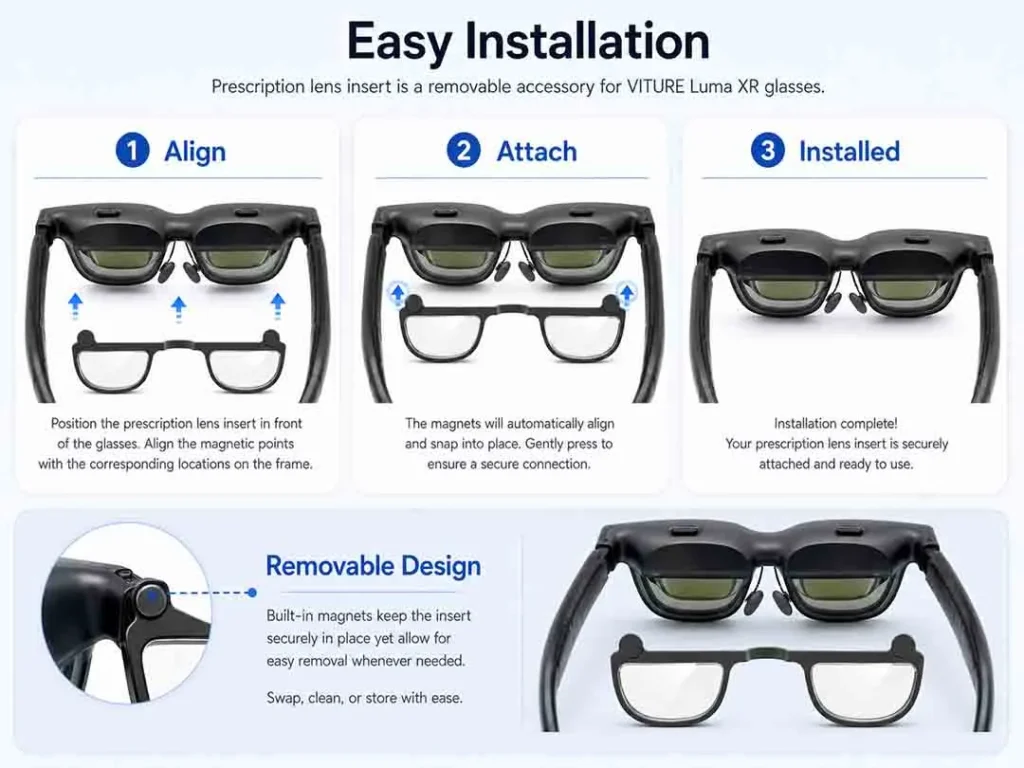
Installation
Hold the XR glasses securely and align each insert with the matching side of the headset. If your inserts are marked left and right, make sure they are installed on the correct side.
Do not force the inserts into place. If they do not align smoothly, stop and check the orientation.
Care and maintenance
Use a clean microfiber cloth to wipe fingerprints and dust from the lenses. Avoid paper towels, harsh chemicals, or abrasive cleaners, as these may damage lens coatings.
When not in use, store your glasses and inserts in a protective case.
Related VITURE Luma Guides
Use these related VITURE Luma guides when you need a more specific answer:
- Compare built-in focus with VITURE Luma myopia adjustment.
- Troubleshoot blurry VITURE Luma text.
- Check whether CYL and AXIS matter in the VITURE Luma astigmatism guide.
- Understand fit and alignment with the VITURE Luma PD and IPD guide.
- Read SPH, CYL, AXIS, and PD in VITURE Luma prescription values.
- Compare whether you can wear glasses under VITURE Luma.
- Compare whether you can wear contacts with VITURE Luma.
- Review +SPH, ADD, and readers in VITURE Luma farsightedness and presbyopia.
- Check multifocal cautions in VITURE Luma progressive and bifocal lenses.
- Compare all routes in VITURE Luma vision correction options.
- Separate comfort symptoms with VITURE Luma eye strain and headache checks.
Frequently Asked Questions
1. Do VITURE Luma glasses need prescription lenses?
Not always. If you have 20/20 vision, or if your myopia falls within the built-in adjustment range and you do not have astigmatism, you may not need prescription inserts. If your prescription exceeds the built-in range or includes astigmatism, custom inserts may be a better option.
2. Does VITURE Luma myopia adjustment correct astigmatism?
No. Built-in myopia adjustment is designed for spherical focus changes. It does not replace CYL and AXIS correction for astigmatism.
3. What is the difference between myopia adjustment and prescription inserts?
Myopia adjustment is a hardware feature built into the headset. Prescription inserts are custom lenses made according to your personal prescription, which may include SPH, CYL, AXIS, and PD.
4. Can I use VITURE Luma if I have high myopia?
Yes, but the best option depends on your prescription and the model you own. If your prescription is stronger than the built-in adjustment range for your VITURE model, custom inserts may be a better option.
5. Can I wear regular glasses under VITURE Luma?
Some users may be able to wear regular glasses under XR glasses, but it may feel uncomfortable and can increase the risk of lens contact. Prescription inserts are designed to reduce the need for regular frames under the device.
6. What do SPH, CYL, AXIS, and PD mean?
SPH measures nearsightedness or farsightedness. CYL measures astigmatism strength. AXIS shows the direction of astigmatism correction. PD measures the distance between your pupils.
7. How do I choose Regular or Large frame size?
Choose the size that matches your VITURE device and your fit needs. Before ordering, confirm your exact model and frame size on the ANNKUTVR product page.
8. Are ANNKUTVR VITURE Luma lenses compatible with Luma Pro and Luma Ultra?
ANNKUTVR VITURE Luma prescription lenses may support Luma, Luma Pro, and Luma Ultra, depending on the exact product option and frame size selected. Please confirm compatibility on the product page before ordering.
Final Thoughts
VITURE Luma, Luma Pro, and Luma Ultra offer a portable way to enjoy large virtual screens, but the viewing experience depends on how well the device matches your personal vision needs.
Built-in myopia adjustment may be enough for some users. However, if you have astigmatism, stronger myopia, different prescriptions in each eye, or difficulty wearing regular glasses under the headset, custom inserts may support a more comfortable and complete prescription setup.
Ready to upgrade? Shop ANNKUTVR VITURE Luma Prescription Lenses today.