Enjoy 5% OFF + FREE shipping on orders $49+! Use Code: 202512AK5

Enjoy 5% OFF + FREE shipping on orders $49+! Use Code: 202512AK5
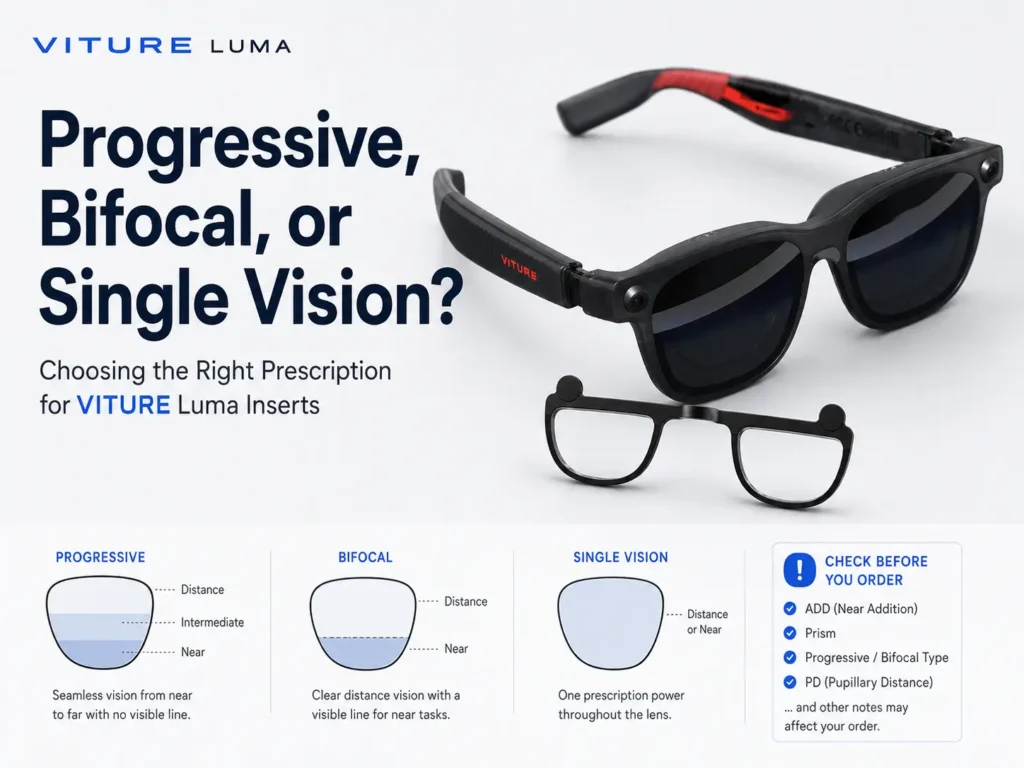
If you wear progressive or bifocal lenses, do not copy that prescription into a VITURE Luma insert order without checking the required values first. Progressive and bifocal prescriptions include multiple viewing zones, while many XR insert routes use confirmed single vision values. VITURE’s official prescription lens frame information says its own route is Single Vision distance only and does not currently support progressive, bifocal, or ADD lenses. That official VITURE rule is useful context, but it should not be automatically treated as ANNKUTVR’s rule unless ANNKUTVR’s own ordering instructions confirm it. If your prescription includes ADD, prism, progressives, bifocals, or complex notes, confirm the correct values before ordering.
Can You Use Progressive or Bifocal Prescriptions With VITURE Luma?
Some progressive or bifocal wearers may be able to use VITURE Luma, but the risky part is the prescription order, not just the glasses themselves. A progressive or bifocal prescription is not the same thing as a simple single vision distance prescription.
The safest answer is this: if your prescription is progressive, bifocal, includes ADD, includes prism, or has other complex notes, confirm the exact values required before buying inserts. For the broader prescription insert buying path, use the VITURE Luma prescription lenses guide first, then use this article for the multifocal and complex-prescription cautions.
This page is not medical advice and cannot convert your prescription. It is a checklist for what to verify with the seller instructions and, when values are unclear, an eye-care professional.
What VITURE Says About Single Vision Distance Lenses
VITURE’s official prescription lens frame page is important because it shows why multifocal prescriptions need caution. On its official route, VITURE states that its customized prescription lenses are currently Single Vision distance prescriptions only. The same official information says progressive, bifocal, and ADD lenses are not currently supported for that VITURE route.
VITURE also instructs progressive or bifocal users on that route to enter distance prescription values and leave ADD blank. That is VITURE’s official prescription lens frame process. It is useful context, but it should not be stretched into a claim about every third-party insert seller.
For ANNKUTVR, check ANNKUTVR’s product instructions and supported prescription rules directly before ordering. If your prescription type is unclear, pause before buying.
Why Progressive and Bifocal Prescriptions Are Different
Progressive and bifocal lenses are built for more than one viewing need. The National Eye Institute explains that single vision lenses correct near vision or distance vision, while multifocal lenses correct more than one distance. Bifocals, trifocals, and progressives are all multifocal categories.
That matters for VITURE Luma because an insert order may ask for a single confirmed power rather than a lens with multiple zones. Cleveland Clinic explains that bifocal lenses have two prescriptions and progressive lenses gradually change power. A progressive prescription line can contain the information an optical professional needs, but it does not mean the values should be copied into any custom insert form without interpretation.
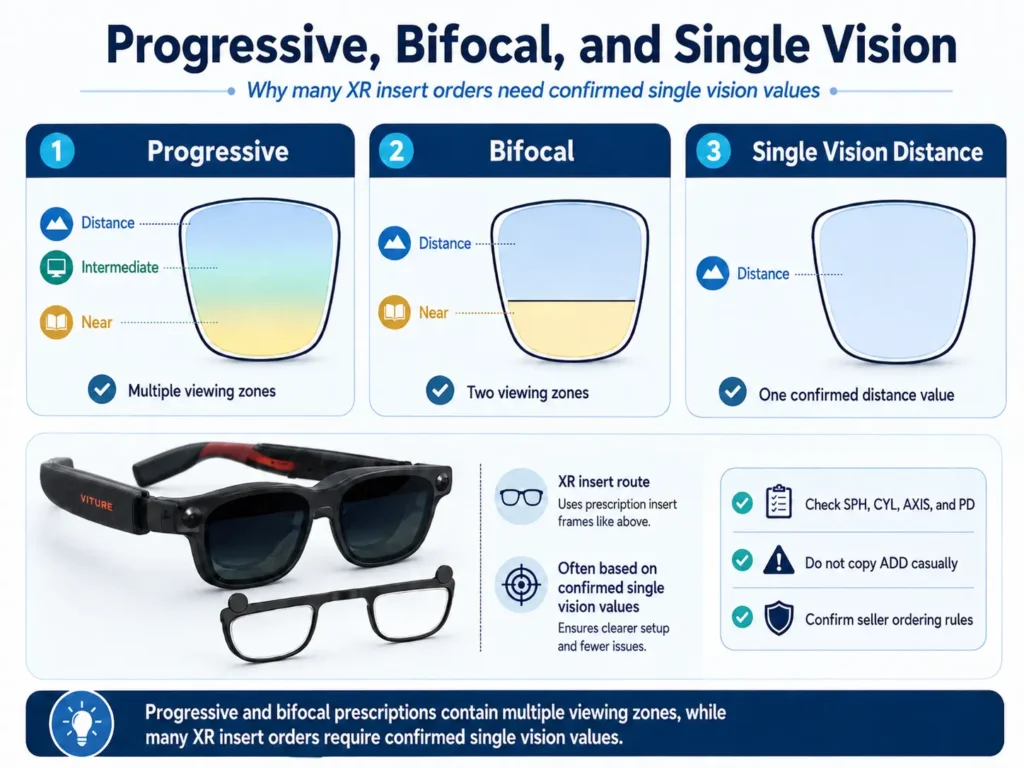
| Lens type | How it works | Why it matters for VITURE Luma inserts | What to confirm |
|---|---|---|---|
| Single vision distance | Uses one correction range for distance viewing. | VITURE’s official prescription lens frame route references Single Vision distance prescriptions. | Confirm whether your chosen insert route requires distance values. |
| Bifocal | Includes two viewing powers, often separated by a visible line. | A bifocal prescription may include near and distance needs, not one simple insert value. | Ask which values are needed and how ADD should be handled. |
| Progressive | Changes power gradually for multiple viewing distances. | Progressive values should not be copied blindly into a single vision order. | Confirm the needed distance or other values with an eye-care professional or seller instructions. |
| Multifocal contact lenses | Use more than one prescription in a contact lens design. | Contact lens prescriptions are not the same as eyeglass or insert prescriptions. | Use a confirmed eyeglass prescription route, not contact values alone. |
What Does ADD Mean, and Why Should You Be Careful?
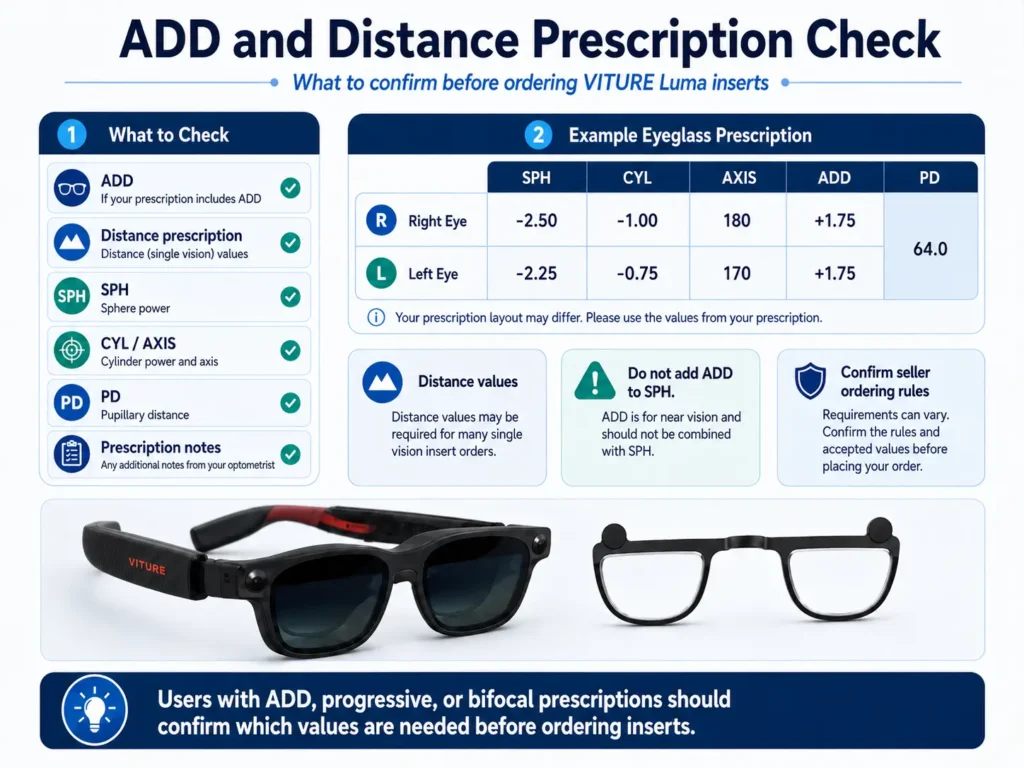
ADD is a near addition used in reading or multifocal correction. Cleveland Clinic’s prescription explainer describes ADD as an additional power used to create another viewing zone. That does not mean the user should combine ADD with SPH for an insert order.
For VITURE Luma progressive lenses or bifocal prescriptions, ADD is a warning to slow down. It often means the prescription is solving more than one viewing distance. If an insert order is single vision, the correct values may need to be confirmed separately.
If your ADD question is mainly about +SPH, presbyopia, readers, or near vision, review the farsightedness and presbyopia guide before placing an insert order.
Why Distance Prescription Values May Matter for XR Inserts
Many XR insert order paths are built around single vision values because the insert is not a progressive or bifocal lens with multiple zones. VITURE’s official route is the clearest example: it says Single Vision distance only and tells progressive or bifocal users on that VITURE route to enter distance prescription values and leave ADD blank.
That does not prove that every third-party insert seller follows the exact same rule. It does show why “I wear progressives” is not enough information for a custom insert order.
If you only have a progressive or bifocal prescription and are unsure which line or value is the distance correction, ask before ordering. The VITURE Luma prescription values article can help you identify fields such as SPH, CYL, AXIS, and PD, but it should not be used as a prescription-conversion tool.
What If Your Prescription Includes Prism or Complex Notes?
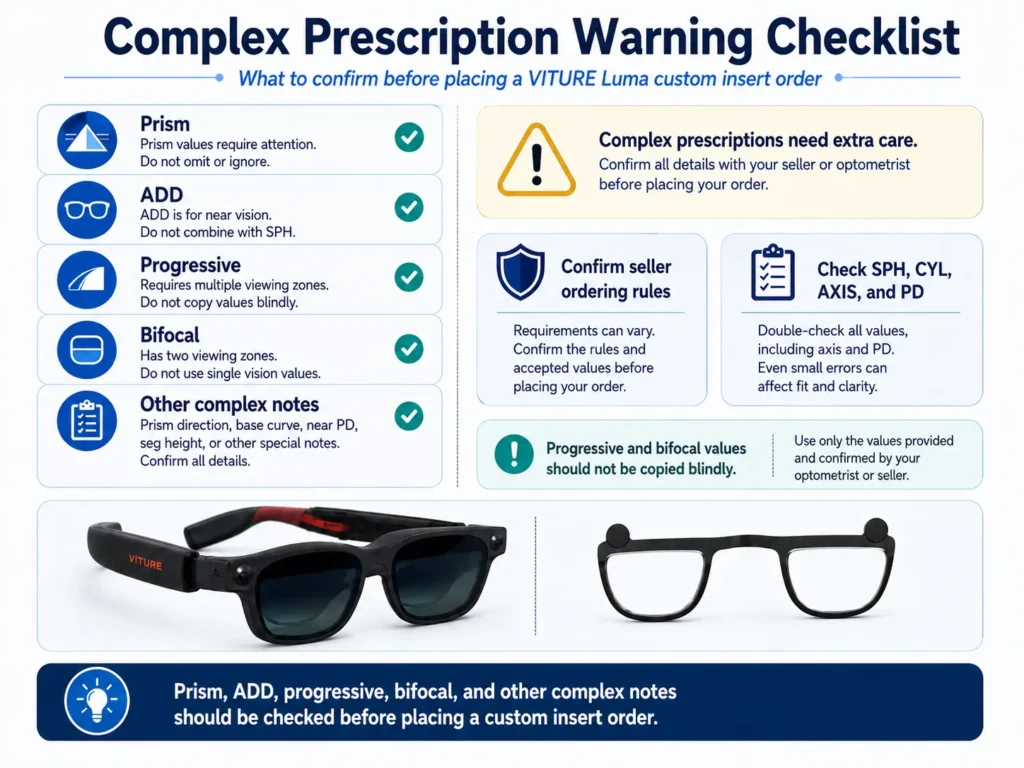
Prism, unusually high values, complex astigmatism, or other prescription notes should be confirmed directly before ordering VITURE Luma inserts. Do not assume support.
Prism is especially important because it is not just another simple lens power. If your prescription includes prism, ask whether the insert provider supports it, how it should be entered, and whether the VITURE Luma model and frame geometry are suitable for that order.
Astigmatism also deserves a separate check. CYL and AXIS values are not replaced by built-in myopia adjustment. If your prescription includes astigmatism, read the VITURE Luma astigmatism guide before assuming blur is only a progressive or bifocal issue.
What to Confirm Before Ordering
Before comparing inserts, collect the values and rules that matter most:
- A recent eyeglass prescription, not only an old contact lens or reader value.
- Distance prescription values if the seller requires them.
- SPH for each eye.
- CYL and AXIS if astigmatism is present.
- PD, including monocular PD if requested.
- Whether ADD should be ignored, entered, or handled by the seller.
- Whether prism is supported.
- Whether progressive or bifocal prescriptions are accepted.
- Your exact VITURE Luma model.
- Custom-lens return, remake, or exchange rules.
| Prescription note | Why it needs caution | Safer next step |
|---|---|---|
| ADD | ADD is a near addition, not a standalone insert value. | Confirm how ADD should be handled before ordering. |
| Progressive | Progressive lenses use multiple viewing powers. | Ask whether single vision distance values are required. |
| Bifocal | Bifocals include more than one correction zone. | Do not copy the prescription blindly; confirm the needed value set. |
| Prism | Prism support is not automatic in custom inserts. | Ask the seller and eye-care professional before ordering. |
| Contact lens prescription | Contact lens prescriptions are a separate category from eyeglass prescriptions. | Confirm eyeglass values for inserts instead of using contact values alone. |
When ANNKUTVR Inserts May Be Worth Comparing
ANNKUTVR prescription inserts may be worth comparing when your prescription values are confirmed, your VITURE Luma model is supported, and you need vision correction without stacking regular glasses under XR glasses.
With progressive, bifocal, ADD, prism, or complex prescriptions, the key is not to rush. Inserts may be a practical option after compatibility and prescription type are confirmed. They should not be presented as a universal fix for blur, and they should not replace advice from an eye-care professional.
If your values are unclear, confirm them first. If the order path and prescription type are supported, then comparing inserts is a reasonable next step.
Comparing Inserts With a Complex Prescription?
ANNKUTVR prescription inserts are designed for VITURE Luma users who need confirmed vision correction without stacking regular glasses under XR glasses. Check your prescription type, PD, model, and ordering rules before buying.
View VITURE Luma Prescription InsertsFAQ
1. Can you use progressive lenses with VITURE Luma?
Progressive lens wearers may be able to use VITURE Luma, but they should not transfer progressive prescription values directly into an insert order. Confirm which single vision or distance values are required.
2. Can you use bifocal lenses with VITURE Luma?
Bifocal wearers should confirm values before ordering because bifocal prescriptions include more than one viewing zone. The insert route may require a specific distance value set.
3. What does ADD mean on a VITURE Luma insert order?
ADD is a near addition used with reading or multifocal correction. It should not be treated as a value to automatically add to SPH for VITURE Luma inserts.
4. Why does VITURE mention Single Vision distance lenses?
VITURE’s official prescription lens frame information says its own customized lenses are Single Vision distance only and do not currently support progressive, bifocal, or ADD lenses. That is VITURE’s route, not automatically every third-party route.
5. Should progressive or bifocal users use distance values?
For VITURE’s official route, VITURE instructs progressive or bifocal users to use distance prescription values and leave ADD blank. For other insert options, confirm the seller’s rules before ordering.
6. What if my prescription includes prism?
Do not assume prism is supported. Ask the insert provider and an eye-care professional how prism should be handled before placing a custom order.
7. Can I use a contact lens prescription for VITURE Luma inserts?
Do not use contact lens values for inserts without confirmation. Contact lens prescriptions and eyeglass prescriptions can differ, so insert orders should use the values requested by the seller.
8. What should I confirm before ordering?
Confirm your eyeglass prescription values, distance or other viewing-distance requirements, PD, CYL, AXIS, ADD handling, prism support, model compatibility, and custom-lens return or remake rules.