Enjoy 5% OFF + FREE shipping on orders $49+! Use Code: 202512AK5

RayNeo GT or GT Max Blurry at the Edges? Check IPD, Nose Pads and Prescription First
The center of your RayNeo GT or GT Max display looks sharp. Then you look toward the corners, and the text starts getting blurry. Maybe the bottom of the screen is cut off. Maybe one side looks worse than the other.
Don’t assume you bought the wrong glasses or need new prescription lenses just yet.
RayNeo GT and GT Max edge blur can involve several different factors:
- IPD: Whether your eyes align with the device’s optical design.
- Nose pads and fit: Where the display sits vertically and how close it is to your eyes.
- Virtual screen size: How far the image extends toward the edges of the optical viewing area.
- Prescription: Whether your vision is properly corrected and any prescription insert is installed correctly.
RayNeo’s official GT Series troubleshooting guide recommends checking these factors, then testing one eye at a time if the image still isn’t clear.
The order matters. Changing everything at once makes it difficult to tell which adjustment actually helped.
Start With This RayNeo GT / GT Max Blur Checklist
Before changing hardware or ordering anything, identify exactly what you are seeing.
| What You Notice | Check First | What the Test Can Tell You |
|---|---|---|
| GT Max edges look blurry | IPD size (S/M/L) | Whether the device size matches your measured IPD. |
| Top or bottom of the screen is cut off | Nose pads and vertical position | Whether moving the glasses changes the visible image area. |
| Corners become clearer when the image is smaller | Virtual screen size | Whether the outer image extends beyond your clearest usable viewing area. |
| Blur occurs with prescription inserts installed | Prescription and insert seating | Whether the correction or installation may be contributing. |
| One eye appears noticeably blurrier | One-eye test | Whether the problem is asymmetric and needs further investigation. |
| Nothing significantly improves the image | RayNeo Support | Persistent blur may require technical inspection or individual fit assessment. |
This is a troubleshooting checklist, not a diagnosis. More than one factor can contribute to the same symptom.
1. Check IPD Before Blaming the Prescription
IPD, or interpupillary distance, is the distance between the centers of your pupils.
For AR glasses, your eye position relative to the optical system matters. A device that does not align well with your eyes may make certain parts of the display harder to see clearly.
But the GT and GT Max handle IPD differently.
RayNeo GT Max: Verify Your S, M or L Size
GT Max comes in three IPD-specific versions.
RayNeo’s current official ranges are:
- S: Below 64mm
- M: 64–67mm, including both endpoints
- L: Above 67mm
If your IPD is 61mm and you purchased the M version, that is a reason to investigate the size mismatch before spending time on prescription adjustments.
The same applies to someone with a confirmed 69mm IPD using the M version.
However, a correct IPD size does not guarantee that every corner will look perfectly sharp.
RayNeo’s own troubleshooting instructions specifically address cases where the GT Max IPD size is correct but edge blur remains.
That is why size verification is the first check, not the final answer.
What If Your IPD Is Close to 64mm or 67mm?
Don’t choose another GT Max size based only on a blurry corner.
Repeat your measurement if the result is uncertain. If you repeatedly fall on opposite sides of a boundary, confirm your IPD before deciding the hardware size is wrong.
Our RayNeo GT Max IPD Size Guide explains the official S/M/L boundaries and what to do at exactly 64mm or 67mm.
RayNeo GT: The IPD Design Is Fixed
The standard RayNeo GT uses a fixed 64mm IPD design.
Unlike GT Max, it is not sold in separate S, M and L optical versions.
Changing the nose pads can help reposition the glasses relative to your face, but it cannot change the GT’s fixed optical IPD.
If you are using the standard GT and repeatedly struggle to align both sides of the display, keep that distinction in mind.
Don’t assume every fitting problem can be solved by pushing the glasses closer to your face.
2. Test the Nose Pads and Vertical Alignment
This is the next thing I would check once IPD is accounted for.
A device can have the correct IPD and still sit too high, too low or at an inconvenient distance from your eyes.
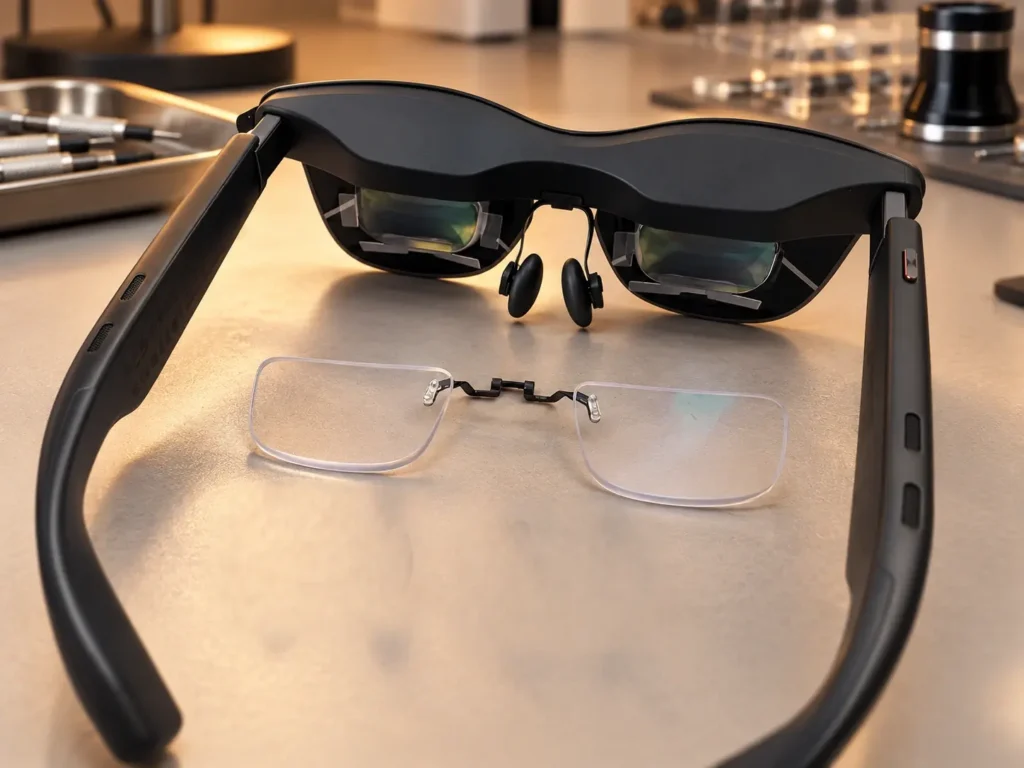
RayNeo supplies interchangeable nose pads for GT and GT Max. Its support documentation recommends experimenting with the included options and adjusting the glasses vertically until the image is centered.
Try a Different Nose-Pad Height
GT Max includes three nose-pad options, while the standard GT includes two.
The best option is not necessarily the one that feels most secure the moment you put the glasses on.
It should also position the display where you can see it properly.
Use a simple test:
- Put on the glasses and display something with visible content near all four corners.
- Keep your head in a natural position.
- Move the glasses slightly upward or downward without forcing the frame.
- Notice whether the missing or blurry sections change.
- Try another included nose-pad option and repeat.
If changing the nose-pad height noticeably improves the image, wearing position is contributing to the problem.
That does not prove IPD is perfect or rule out every optical limitation. It tells you that fit is a variable worth correcting.
Check the Glasses’ Position, Not Just the Nose Pads
Two users can choose the same GT Max IPD size and still experience different viewing positions.
Nose shape, ear position, facial structure and how the temples sit can all affect where the optics rest relative to the eyes.
Keep the glasses level and avoid an exaggerated upward or downward angle.
RayNeo also warns against forcing or bending the temple arms to change their width. The GT and GT Max do not support manual temple-width adjustment.
Don’t try to repair optical alignment by bending the frame.
3. Try a Smaller Virtual Screen
This is an easy test to overlook.
You bought display glasses for a large virtual screen. Naturally, reducing the screen size might sound like defeating the purpose.
But RayNeo officially recommends reducing the virtual screen size when the edges remain blurry.
Why?
A larger image extends farther toward the outer part of the viewing area. Depending on the optical fit, those outer sections may be more difficult to see clearly or may be partially cut off.
Reducing the display size can bring content closer to the region where you get a clearer view.
Treat Screen Size as a Test, Not a Permanent Fix
GT Max users have discussed switching between smaller and larger display settings depending on whether they are watching movies, gaming or reading desktop text.
There is no universal setting that works best for everyone.
For troubleshooting:
- Display the same content at your normal screen size.
- Reduce the virtual screen size using the available controls.
- Check whether the previously blurry corners become easier to read.
- Return to the original size to verify the difference.
If a smaller image substantially improves edge visibility, that tells you something about your usable viewing area.
It does not automatically tell you whether the original limitation comes from IPD, positioning or the optical design.
A smaller screen can be a practical compromise. It is not a substitute for checking the fit.
4. Check Your Prescription Insert — If You Use One
Prescription is often blamed too early.
If you have myopia or astigmatism, an appropriate prescription insert may be necessary for clear viewing. But ordering stronger lenses simply because the display corners look blurry is not a sound troubleshooting method.
RayNeo’s official instructions recommend confirming that any prescription lenses are correctly installed.
That check should come after you have considered the device’s IPD and wearing position.
If You Already Have Prescription Inserts
Check the following:
- Are the lenses made for your exact GT or GT Max model?
- Are they fully and correctly seated?
- Are the optical surfaces clean?
- Do the lenses match your current prescription?
- Did the blur appear or noticeably change after installing them?
GT and GT Max should not be treated as automatically sharing the same prescription insert.
If the insert is incorrectly seated, adjusting the nose pads alone may not resolve the resulting viewing problem.
If your prescription is outdated or entered incorrectly, the correction itself may also contribute to unclear text.
If You Don’t Have Prescription Inserts
If you normally need distance vision correction, do not assume the AR display will automatically compensate for your eyesight.
Your refractive error still needs to be considered.
However, a prescription insert corrects vision. It does not change the GT Max IPD size or move the display into a better vertical position.
For the full compatibility explanation, see Do RayNeo GT and GT Max Support Prescription Lenses?.
ANNKUTVR also offers model-specific RayNeo GT Prescription Lenses and RayNeo GT Max Prescription Lenses for users who need optical correction.
Those products are relevant when a prescription is actually needed, not as a guaranteed solution for every blurry corner.
5. Close One Eye at a Time
This is one of the more useful checks in RayNeo’s official troubleshooting process.
It is also easy to do without replacing hardware.
Keep the glasses in the same position and use a static image with small text near the center and edges.
Then:
- Close your left eye and inspect the display through your right eye.
- Close your right eye and repeat through your left eye.
- Compare the sharpness, visibility and location of any blurry sections.
- Note whether the problem appears similar on both sides.
What the Results Can — and Cannot — Tell You
If both eyes show a similar loss of clarity toward the edges, that is useful information when examining the overall fit and viewing area.
If one eye remains noticeably worse, record which eye and which part of the image are affected.
But don’t turn these observations into an automatic diagnosis.
One eye blurry does not necessarily mean one prescription lens is wrong.
The cause may involve prescription correction, optical positioning, insert installation or the device itself.
The one-eye test helps describe the pattern. It does not establish the cause by itself.
Does 3DoF Fix RayNeo GT Max Edge Blur?
Not directly.
RayNeo GT and GT Max support spatial viewing modes, including a mode that allows the virtual screen to remain anchored in space.
That can change how you interact with content near the edges.
For example, instead of moving your eyes far toward the outer part of a head-following display, a pinned screen can let you turn your head toward the content.
That may make some peripheral content easier to inspect.
But this is not the same as correcting the optics.
3DoF does not change:
- your interpupillary distance;
- the GT Max hardware IPD size;
- the nose-pad height;
- your prescription values;
- the physical installation of prescription inserts.
Think of it as a different way of viewing the screen, not a direct optical blur correction.
If the image itself remains blurry or distorted even when properly positioned, enabling 3DoF should not be presented as a guaranteed fix.
What If the Edges Are Still Blurry After Every Adjustment?
There is an important limit to home troubleshooting.
Some users may still perceive slight softness toward the edges even after choosing the correct IPD size and adjusting the glasses.
That experience can vary with the individual wearer, optical geometry, virtual screen size and viewing position.
But there is a difference between minor peripheral softness and a screen that you cannot use comfortably.
When to Contact RayNeo Support
RayNeo advises contacting its support team if one side remains blurry or a fully clear image cannot be achieved after the recommended adjustments.
That is particularly reasonable when:
- the center is persistently distorted, not merely the far corners;
- one eye continues to show a substantial difference after basic checks;
- changing nose pads and screen size provides no meaningful improvement;
- the view remains unusable despite the correct prescription and installation.
Prepare the details RayNeo requests: your exact device model, GT Max IPD size if applicable, nose-pad option, and whether the issue affects one or both eyes.
For the official steps and contact information, use RayNeo GT Series Support — Blurry Edges Troubleshooting.
Do not attempt to disassemble the display optics or modify the frame to solve an alignment problem.
The Order I Would Follow Before Spending Money
If the goal is to identify why your RayNeo GT or GT Max looks blurry, keep the process simple:
- Confirm your device model. GT and GT Max have different IPD designs.
- Check IPD. For GT Max, verify the purchased S/M/L version.
- Try the included nose pads. Watch whether moving the glasses changes the visible image.
- Center the display. Adjust wearing height without forcing the frame.
- Reduce the virtual screen size. Compare the same content before and after.
- Clean the optical surfaces. Check for smudges and contamination.
- Verify prescription inserts, if fitted. Confirm the model, prescription and installation.
- Test one eye at a time. Record any consistent difference.
- Contact RayNeo if the problem persists.
The goal is not to make every adjustment possible.
It is to find out which variable actually changes the picture.
If the screen improves when you adjust the nose pads, keep investigating fit. If the correction is wrong, address the prescription. If the GT Max size does not match your confirmed IPD, that is a separate hardware-sizing issue.
And if none of those checks works, don’t keep buying accessories in the hope that one of them will solve it.
For related guidance across RayNeo models, see the ANNKUTVR RayNeo Prescription Lens Hub.
FAQ
Why is the center of my RayNeo GT or GT Max clear but the edges blurry?
The center may align well with your eyes while the outer display extends into an area that is harder to view clearly. Possible contributing factors include IPD, wearing position, nose-pad height and virtual screen size. Start by checking IPD and fit, then compare the image at a smaller screen size. Center clarity alone does not identify the cause.
How can I tell whether GT Max edge blur is caused by IPD or nose pads?
First confirm that your GT Max S, M or L version matches your measured IPD. Then test different nose-pad heights and slightly adjust the glasses vertically. If the blurry area changes significantly with positioning, fit is contributing to the problem. However, this does not prove that IPD is the only other possible cause or that your optics are defective.
Can changing the nose pads fix blurry edges on RayNeo GT Max?
It can help when the problem involves vertical alignment or wearing position. RayNeo officially recommends trying different nose-pad heights to center the display. Nose-pad adjustment does not change the hardware IPD size, and it cannot guarantee perfectly sharp edges for every wearer.
Does 3DoF fix edge blur on RayNeo GT Max?
Not directly. Spatial viewing modes can change how you look at content. With a pinned screen, turning your head may make peripheral content easier to inspect. However, 3DoF does not change IPD, nose-pad height, prescription correction or the physical optics, so it is not a direct fix for optical edge blur.
Can prescription lenses fix blurry edges on RayNeo GT or GT Max?
Prescription lenses may improve clarity when uncorrected refractive error contributes to the problem. They do not correct an IPD mismatch, change vertical alignment or eliminate every optical limitation. If you already use prescription inserts, confirm that the lenses match your prescription, fit the exact device model and are installed correctly before considering replacements.
What should I do if only one side of my RayNeo GT Max remains blurry?
Close one eye at a time and record which side remains blurry. Check the lens surfaces, prescription insert installation if applicable, and wearing position. If the problem remains after the recommended adjustments, RayNeo advises contacting support with your IPD size, nose-pad choice and whether the blur affects one or both eyes. A one-sided symptom alone does not identify the cause.